
NewAI Shorts is here
Your best moments,cut into shorts for you.
Castream finds the best moments in a video and turns them into captioned vertical shorts, ready for TikTok, Instagram Reels and YouTube Shorts. Start from a past stream, a video on your phone or a link.


Free trial for web sign-ups only. Card required. $16.99/month after 3 days unless canceled.
In Castream 7.0 for iPhone and on the web. Android is rolling out now.
- shorts per video
- 3
- shorts per video
- max per short
- 60 s
- max per short
- vertical, captioned
- 9:16
- vertical, captioned
- caption styles
- 4
- caption styles
How it works
From a long video to shorts in three steps
- 1
Pick a video
Choose a past stream, a video from your phone or a link. Long videos are fine.
- 2
Castream finds the moments
It listens to the whole video, reads your chat if it was a stream, and picks the strongest moments.
- 3
Keep, edit and post
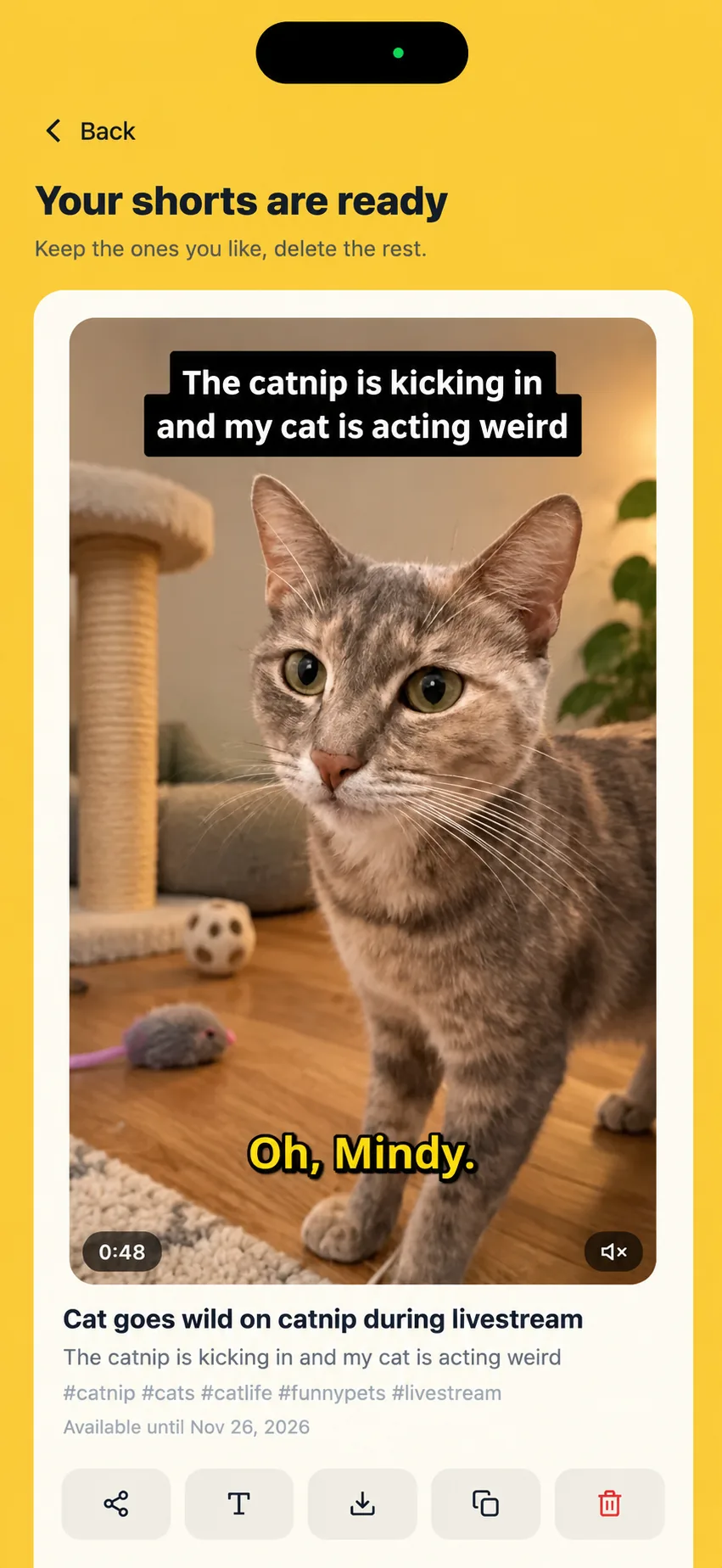
Each short comes with captions, a title and hashtags. Keep the ones you like, then download or share them.
Free trial for web sign-ups only. Card required. $16.99/month after 3 days unless canceled.
Short 1
Ready
Short 2
Cutting
Short 3
Up next
Works with your videos
Bring any video, not just streams
You don't need to be a streamer. Anything you filmed or saved can become shorts.
Past streams
Every Castream stream is recorded. Make shorts from it in a tap, and the moments your chat reacted to count too.
Phone videos
Upload from your camera roll, long videos included. If an upload stops, it picks up where it left off when you reopen the app.
Links
Paste a Dropbox or Google Drive share link, or a direct link to an MP4 file.
Uploads on the web
On a computer? Drop a video into Shorts on castream.io and get the same shorts.
Captions
Captions that stop the scroll
Pick a style before your shorts are cut. Every word is timed to your voice, and the word being spoken lights up.
Fine-tune them in the web editor
- Fix any word the AI got wrong
- Change the text and highlight colors
- Move captions up or down
- Edits never use credits
Made from your streams
Your chat already knows your best moments
When a short comes from a stream, Castream lines up your words with your chat on one timeline, so it can see when viewers laughed, reacted or asked for more.
What most clip tools see
- Only the video and the words in it.
- Loud or fast moments, whether or not anyone cared.
What Castream sees
- Your words, lined up with your chat on the same timeline.
- The moments when viewers reacted, laughed or asked for more.
- Chat from every platform you streamed to, in one place.
What you get
Everything you need to post today
Vertical 9:16 video
Framed for phones, up to 60 seconds each.
Word-by-word captions
Burned in, in the style you picked, with the spoken word highlighted.
A hook on screen
A short line at the top tells viewers why to keep watching.
Title and hashtags
Each short comes with a title, a description and hashtags to paste when you post.
Download and share
Save shorts to your phone or send them to TikTok, Instagram or YouTube from the share sheet.
Kept for 30 days
Keep the shorts you like, delete the rest. Download the ones you want to keep for good.
Credits
Simple credits, refunded if anything fails
1 credit = 1 minute of video
A 45-minute video uses 45 credits, however many shorts come out of it.
Free trial
15
credits
Creator
50
credits / month
Pro
200
credits / month
Failed jobs are always refunded
If a job fails or you cancel it, every credit goes back to your balance.
Need more? Packs from $4.99
Buy packs on the web: 100 credits for $4.99, 300 for $11.99, 1,000 for $29.99. Pack credits don't expire while you're on Creator or Pro.
Monthly credits reset
Plan credits don't roll over. They reset on your renewal date.
- Prices in USD. Tax may be added at checkout.
Plans
Plans & Pricing
Every plan includes desktop OBS support and mobile Go Live.
Creator
For regular creators
Full power for regular creators.
$9.99
- Desktop and mobile streaming
- 3 simultaneous destinations
- Unlimited streaming time
- 720p @ 2.5mbps (mobile)
- 720p @ 4mbps (desktop)
- Stream recordings (30-day retention)
- AI shorts: 50 credits / month
Pro
Best for advanced users
All the serious tools you need.
$16.99
- Everything in Creator
- 5 simultaneous destinations
- 1080p @ 6mbps
- Stream recordings (30-day retention)
- AI shorts: 200 credits / month
- Priority support
Compare
Castream vs Prism Live
Read comparison →Use case
Plan guides for churches & creators
Explore guide →* TikTok & Instagram supported via RTMP. Native OAuth for YouTube, Twitch, Facebook & Facebook Pages.
FAQ
Questions, answered
Do I need to be a live streamer?
No. AI Shorts works with videos from your phone and with links too. Streams just give it one extra signal: your chat.
Which plans include AI Shorts?
Creator includes 50 credits a month and Pro 200. Free trials include 15 credits, enough for a 15-minute video.
Can I try it for free?
Yes. Sign up on the web for a 3-day free Pro trial, which includes 15 AI Shorts credits. A card is required, and you're billed after 3 days unless you cancel.
What if a job fails?
You get every credit back automatically. Canceled jobs are refunded too.
How many shorts do I get from one video?
Up to 3 shorts of up to 60 seconds each. Videos with few strong moments may give fewer.
Where can I post my shorts?
Anywhere vertical video goes: TikTok, Instagram Reels, YouTube Shorts and Facebook Reels. Download each short or share it from your phone.
Can I change the captions?
Yes. Pick Classic, Bold, Boxed or Clean before your shorts are cut. On the web, the caption editor lets you fix words, change colors and move captions. Edits don't use credits.
Can I upload long videos from my phone?
Yes. Long uploads are sent in parts, and if one stops, it picks up where it left off when you reopen the app.
Which links work?
Dropbox and Google Drive share links, or a direct link to an MP4 file. The file has to be shared so that anyone with the link can open it.
What languages work?
Transcription and captions work best in English, Spanish, French, German, Portuguese, Italian, Dutch, Russian, Hindi and Japanese, including videos that switch between them.
How long are my shorts kept?
Shorts are kept for 30 days, so download the ones you want to keep. Stream recordings are also kept for 30 days.
Is it on Android?
AI Shorts is part of Castream 7.0. It's live on iPhone and on the web, and the Android update is rolling out now.
Your next short is already on your phone.
Download Castream, pick a video and get your first shorts in minutes.
Free trial for web sign-ups only. Card required. $16.99/month after 3 days unless canceled.
In Castream 7.0 for iPhone and on the web. Android is rolling out now.