
Go live everywhere.Then turn it into shorts.
Castream takes you live from your phone on YouTube, Twitch, Facebook and more at the same time. New: AI Shorts finds the best moments in your streams and phone videos and turns them into captioned vertical shorts.


Free trial for web sign-ups only. Card required. $16.99/month after 3 days unless canceled.
YouTube · Twitch · Facebook · TikTok · Instagram · LinkedIn · Custom RTMP
Connect with OAuth or paste your stream key — both work.
One app, two jobs
Reach people live. Keep reaching them after.
Multistream
One stream, every platform
- YouTube, Twitch and Facebook with one tap
- TikTok, Instagram, LinkedIn or any RTMP with a stream key
- Camera, screen, or both with a camera overlay
- One chat for every platform
AI Shorts
One video, three shorts
- Finds the best moments for you
- Vertical, captioned, up to 60 s each
- From streams, phone videos or links
- Keep, download and share
How it works
From a long video to shorts in three steps
- 1
Pick a video
Choose a past stream, a video from your phone or a link. Long videos are fine.
- 2
Castream finds the moments
It listens to the whole video, reads your chat if it was a stream, and picks the strongest moments.
- 3
Keep, edit and post
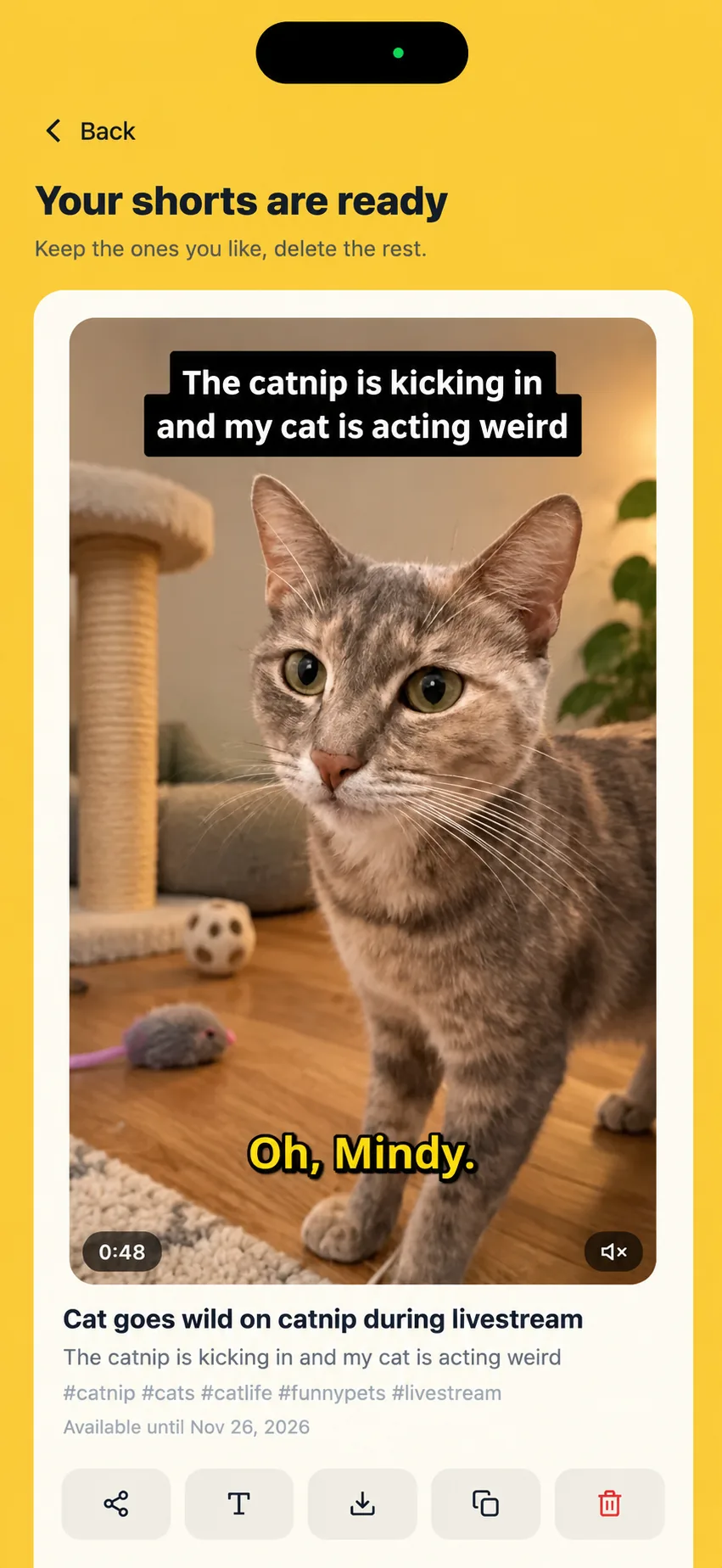
Each short comes with captions, a title and hashtags. Keep the ones you like, then download or share them.
Free trial for web sign-ups only. Card required. $16.99/month after 3 days unless canceled.
Short 1
Ready
Short 2
Cutting
Short 3
Up next
Works with your videos
Bring any video, not just streams
You don't need to be a streamer. Anything you filmed or saved can become shorts.
Past streams
Every Castream stream is recorded. Make shorts from it in a tap, and the moments your chat reacted to count too.
Phone videos
Upload from your camera roll, long videos included. If an upload stops, it picks up where it left off when you reopen the app.
Links
Paste a Dropbox or Google Drive share link, or a direct link to an MP4 file.
Uploads on the web
On a computer? Drop a video into Shorts on castream.io and get the same shorts.
Captions
Captions that stop the scroll
Pick a style before your shorts are cut. Every word is timed to your voice, and the word being spoken lights up.
Fine-tune them in the web editor
- Fix any word the AI got wrong
- Change the text and highlight colors
- Move captions up or down
- Edits never use credits
Better together
Your stream works twice
Go live everywhere
Reach viewers on YouTube, Twitch and Facebook at the same time.
Castream records it
Every stream is saved, with your chat lined up to the video.
Post the best moments
Turn the highlights into shorts and keep growing after the stream ends.
Multistream
Go live on every platform at once
Stream your camera, share your screen, or both with a live camera overlay. Connect YouTube, Twitch and Facebook in a tap, and add any RTMP destination with a stream key.
Choose what to stream
- YouTube
- Twitch
- TikTok
- Custom RTMP
Free trial for web sign-ups only. Card required. $16.99/month after 3 days unless canceled.
Reach every audience. One stream.
Connect YouTube, Twitch, and Facebook with one tap. Add TikTok, Instagram, LinkedIn, or any RTMP destination by pasting a key. Your stream goes everywhere — you stay in one place.
What you get
Everything you need to look pro — from your phone
These aren't promises on a roadmap. They're live right now. Tap any card for the real details.
Multistream to everywhere
One stream reaches all your platforms. Set it up once, go live with a tap.
- YouTube, Twitch, Facebook, and any RTMP destination — all at once.
- Works from your phone or from OBS on desktop.
- If one platform has issues, your other streams stay live.
Screen + camera, together
Share games, apps, demos, or walkthroughs while your live camera stays visible on top.
- Movable picture-in-picture camera over your shared screen.
- Capture device audio, your microphone, or both.
- Keep chat, lower thirds, and live overlays in the broadcast.
- Continue streaming while you use other apps.
One chat for every viewer
Stop switching tabs. See YouTube, Twitch, and Facebook chat in one place and reply to everyone at once.
- Every message from every platform, one screen.
- Reply once — your response goes to all platforms.
- Know exactly where each viewer is watching from.
Professional overlays, no desktop needed
Add names, titles, live chat, and branding to your stream — all from your phone.
- Live chat from all platforms displayed directly on your video.
- Lower thirds to introduce guests, topics, or segments with one tap.
- Location and custom text overlays for context and branding.
- Platform badges that update dynamically while you stream.
From a Castream customer
“Compared to other RTMP streaming services, Castream is much easier to use. We can go live from OBS or from iPhone and Android without friction. Recordings stay available for 30 days, we can download them almost immediately after a stream ends, and Broadcast Again makes it easy to reuse past live streams directly from the dashboard.”
Global Ministry & Media Network
Credits
Simple credits, refunded if anything fails
1 credit = 1 minute of video
A 45-minute video uses 45 credits, however many shorts come out of it.
Free trial
15
credits
Creator
50
credits / month
Pro
200
credits / month
Failed jobs are always refunded
If a job fails or you cancel it, every credit goes back to your balance.
Need more? Packs from $4.99
Buy packs on the web: 100 credits for $4.99, 300 for $11.99, 1,000 for $29.99. Pack credits don't expire while you're on Creator or Pro.
Monthly credits reset
Plan credits don't roll over. They reset on your renewal date.
- Prices in USD. Tax may be added at checkout.
Plans
Plans & Pricing
Every plan includes desktop OBS support and mobile Go Live.
Creator
For regular creators
Full power for regular creators.
$9.99
- Desktop and mobile streaming
- 3 simultaneous destinations
- Unlimited streaming time
- 720p @ 2.5mbps (mobile)
- 720p @ 4mbps (desktop)
- Stream recordings (30-day retention)
- AI shorts: 50 credits / month
Pro
Best for advanced users
All the serious tools you need.
$16.99
- Everything in Creator
- 5 simultaneous destinations
- 1080p @ 6mbps
- Stream recordings (30-day retention)
- AI shorts: 200 credits / month
- Priority support
Compare
Castream vs Prism Live
Read comparison →Use case
Plan guides for churches & creators
Explore guide →* TikTok & Instagram supported via RTMP. Native OAuth for YouTube, Twitch, Facebook & Facebook Pages.
FAQ
Questions before you go live
Do I need to be a live streamer?
No. AI Shorts works with videos from your phone and with links too. Streams just give it one extra signal: your chat.
Which plans include AI Shorts?
Creator includes 50 credits a month and Pro 200. Free trials include 15 credits, enough for a 15-minute video.
What if a job fails?
You get every credit back automatically. Canceled jobs are refunded too.
How many shorts do I get from one video?
Up to 3 shorts of up to 60 seconds each. Videos with few strong moments may give fewer.
Can I really multistream from just my phone?
Yes. Castream is built mobile-first. Open the app, connect your platforms, and choose your camera or Android screen. Your stream reaches YouTube, Twitch, Facebook, and any RTMP destination simultaneously — no laptop or desktop needed.
Can I share my screen and camera at the same time?
Yes, on Android. Share your phone screen and add a movable live camera overlay on top. You can capture device audio, your microphone, or both, and keep using Castream overlays while you stream. Screen capture is also available on iOS.
Can I stream to TikTok and Instagram?
Yes. Paste the RTMP server URL and stream key from TikTok or Instagram into Castream and you're live. YouTube, Twitch, and Facebook connect with one-tap OAuth.
How does the free Pro trial work?
Sign up on the web to start a 3-day free Pro trial. A card is required, and you will be billed monthly or annually after the trial unless you cancel first. The free trial is only available for web sign-ups.
What if I also use OBS or a desktop setup?
Castream works with OBS too. Use your Castream stream key in OBS to send your desktop stream to all your connected platforms. Mobile and desktop, same account.
How is Castream different from Restream or Streamyard?
Castream is mobile-first. Most multistreaming tools require a browser or desktop app. Castream lets you go live from your phone with overlays, unified chat, and multistreaming built in — no extra hardware needed.
What if my YouTube channel isn't enabled for live streaming yet?
YouTube requires you to enable live streaming on your channel before you can go live — it can take up to 24 hours the first time. Castream walks you through enabling it during setup, and once it's on, you're good to go for every future stream.
Will there be lag or quality issues streaming to 3 platforms at once?
No. Castream ingests your stream once and relays it server-side to each platform independently. Adding a second or third destination doesn't touch your phone's upload — your bitrate, resolution, and latency stay exactly the same whether you stream to one platform or six.
Can I test it without going live publicly?
Yes. You can stream to your Castream profile without connecting or going live to any external platform. It's a great way to test your setup, check audio and video quality, and get comfortable before broadcasting to YouTube, Twitch, or anywhere else.
Go deeper
See how Castream compares
Side-by-side breakdowns against other tools, plus ready-made guides for your specific use case.
Built for your world

Church Streaming
Bring your church together. Stream services to YouTube and Facebook from one simpler setup.

IRL Vloggers
Go live on the go — multistream IRL content from your phone.

Gaming

Podcasters & Talk Shows
Turn your podcast into a live show across every major platform.

Musicians & DJs
Stream concerts, DJ sets & performances to all platforms at once.

Fitness Coaches
Run live classes on YouTube, Facebook & RTMP without extra apps.

Sports & Esports Clubs
Stream games, matches & tournaments to every platform at once.

Educators & Webinars
Teach live across YouTube, Facebook Groups & private RTMP channels.
Go live today. Post shorts tomorrow.
Download Castream for free, connect your channels and turn your next stream into shorts.
Free trial for web sign-ups only. Card required. $16.99/month after 3 days unless canceled.